SMS Verification Consent
How users opt in to receive verification codes.
Last updated: April 28, 2026
At a glance
- One-time codes only. The only message we ever send is a six-digit verification code at sign-in.
- User-initiated. A code is sent only when the user explicitly enters their phone number, ticks an explicit consent checkbox, and taps the "Continue" button.
- No marketing. No promotional, marketing, or follow-up messages of any kind.
- Two channels. Codes are delivered via WhatsApp by default. Users can switch to SMS on the next screen.
- Carrier rates apply. Standard message and data rates from the user's mobile carrier may apply for SMS delivery.
- Opt out at any time. Stop receiving messages by not requesting a code, or delete the account from in-app Settings.
The opt-in screen
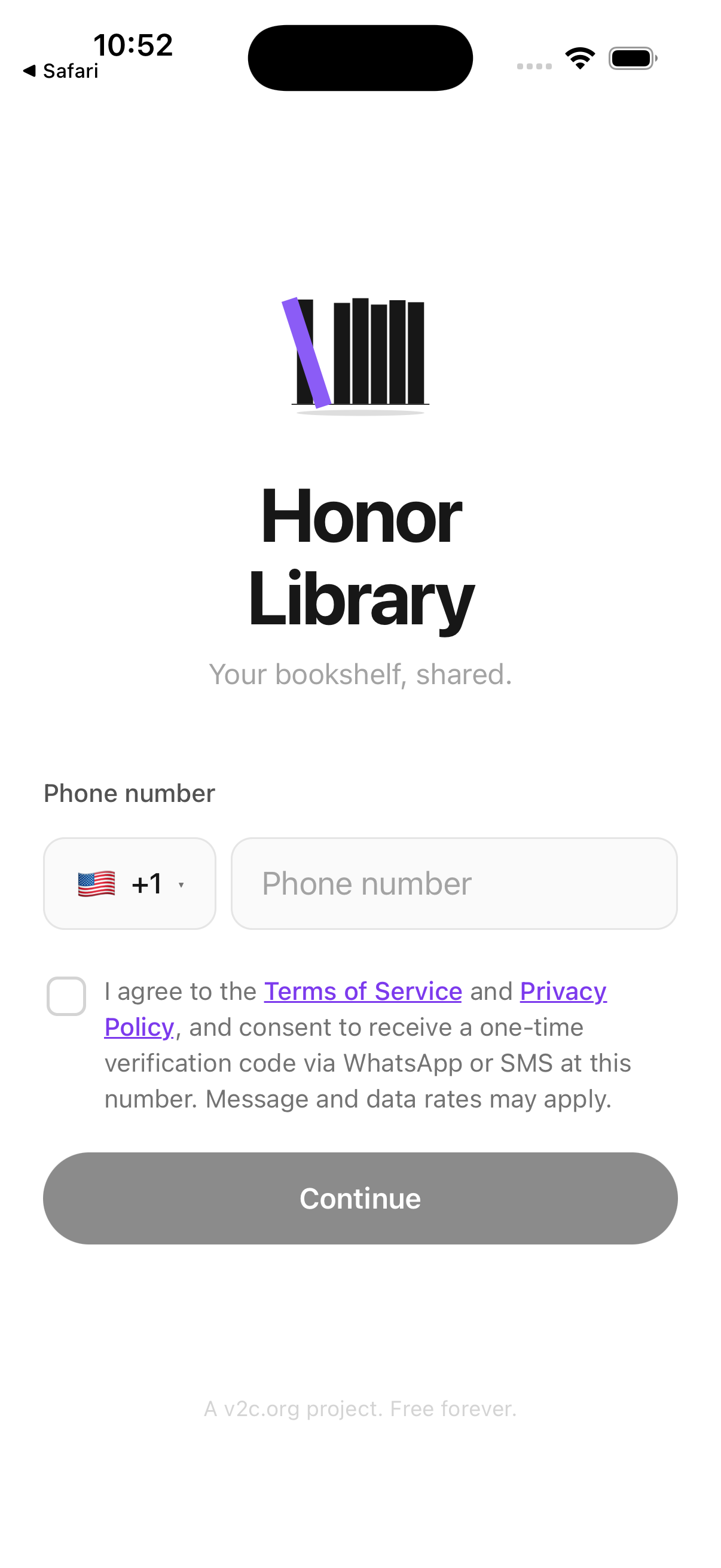
The screenshot below shows the actual sign-in screen of the Honor Library mobile app, where opt-in occurs. The phone number field, country selector, explicit consent checkbox with Terms/Privacy links, and "Continue" button are all visible. The "Continue" button is disabled until the user enters a valid phone number and ticks the consent checkbox.
Step-by-step opt-in flow
- The user installs Honor Library from the iOS App Store or Google Play and opens the app.
- On the sign-in screen, the user selects their country from the flag-and-code picker (auto-detected from device locale, can be changed manually) and enters their phone number into the labeled "Phone number" field.
- The user reads the consent text and ticks the checkbox: "I agree to the Terms of Service and Privacy Policy, and consent to receive a one-time verification code via WhatsApp or SMS at this number. Message and data rates may apply."
- The Terms and Privacy links open honorlibrary.org/terms and honorlibrary.org/privacy respectively.
- The user taps the "Continue" button, which only becomes active once both a valid phone number is entered and the consent checkbox is ticked. This explicit user-initiated action constitutes opt-in consent.
- A single one-time six-digit verification code is delivered to the entered number. WhatsApp is the default channel; if the user does not receive the code within 25 seconds, an "Send via SMS instead" link appears, allowing the user to explicitly request SMS delivery on a separate screen.
- To receive a new code (for example, after the first expires or the user signs in on a new device), the user must repeat the same explicit action. There is no auto-resend.
What we do not do
- We do not send marketing messages, promotional offers, or any follow-up SMS of any kind.
- We do not allow opt-in via website form, paper, or text keyword. The mobile app sign-in flow is the only opt-in path.
- We do not share phone numbers with anyone other than Twilio (our SMS/WhatsApp delivery provider) and Supabase (our authentication backend), and only for the purpose of delivering the verification code.
- We do not retain phone numbers from users who never complete sign-in.
How to opt out
The simplest way to stop receiving any future verification messages is to not request a code. Because each code is sent only in direct response to a user-initiated tap on the "Continue" button, no further messages will be sent unless the user takes that action again.
To remove the phone number from our records entirely, the user can delete their account from the in-app Settings screen (Settings → Delete Account). Deletion is permanent and removes the profile, books, contact hashes, devices, and audit log entries within 24 hours.
Questions about consent or opt-out: contact@honorlibrary.org.
Operator
Honor Library is operated by V2C Inc, a US 501(c)(3) nonprofit (EIN 33-3915449), at v2c.org. SMS and WhatsApp delivery is provided by Twilio Inc.